


01
Going Too Far with Editing
One thing I’ve done—and according to some, I still do—is over-editing. This usually means pushing the saturation, contrast, or other adjustments too far in an effort to make the image look better. But what “better” looks like is different for everyone.
If you like bold, saturated images, a strong color boost might suit your style. On the other hand, if you prefer a more muted look, even a small bump in saturation can feel like too much. The tricky part is that your eyes adjust during the editing process. You start tweaking one thing, then another, and soon you’re caught in a loop of adding more because something always feels like it’s missing.
The best way to avoid this is to take a break. Step away from the image and come back later with fresh eyes. This isn't always necessary—sometimes a quick edit can give you a result you're happy with right away. But if you ever feel like the image just isn't working, it's usually a sign you need to pause and reset.

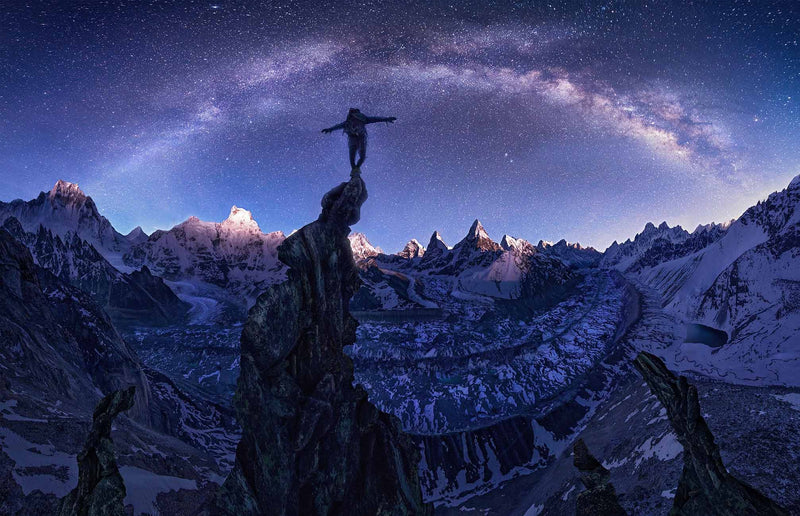
This image from Saudi was one I originally over-edited to the point where it started looking a bit otherworldly. I only realized this after stepping away and revisiting what I thought was the final version—this time viewing it on my phone with fresh eyes. Sometimes simply changing where or how you look at an image gives you a new perspective; checking it on your phone in the lounge instead of in Photoshop on your laptop can make a big difference. In this case, I realized I’d pushed the edit too far and needed to figure out when things started to go wrong. Because I save multiple versions of my files at different stages, I was able to roll back to an earlier point and start again without having to redo everything from scratch.
02
Going Too Warm
Warm, colorful tones are often popular—especially when you've captured a dramatic red sunset. It’s tempting to push the reds and saturation even further to make the scene more intense. But for warmth to have impact, it needs contrast. That’s why maintaining a balance between warm and cool tones is essential.

In fact, adding a touch of cool tones—often more than the original scene had—can actually make the warm tones stand out more. Without those cooler tones, the image can feel flat or overly tinted.

September
KAZAKHSTAN TOUR
Limited spots
One approach is to keep or even boost the warm tones in the highlights (for example, using the Highlights section in split toning or Camera Raw). You can also slightly warm the overall white balance. But at the same time, introduce cool tones—typically blue—into the shadows using split toning, with a saturation value around 10 to 25.

And be cautious with white balance: don’t push it too far toward warm, or the image may start to feel unnatural! If you want in-depth help with color balancing then check out my post-processing Color Editing Tutorial here.
03
Don't Overdo the Orton Effect!
The Orton Effect—named after photographer Michael Orton —adds a dreamy, soft-focus look to your image. There are various ways to apply it, but it usually involves blending two layers and adding a soft blur to selected areas like water or sky. Used carefully, it can definitely enhance a landscape photo.
So I hear you thinking, what is the problem then Max?!
Well, the effect is often overused. People typically start with just a subtle application, but as their eyes (and taste) adjust to the look, they tend to push it further each time. That’s when the image can lose contrast, clarity, or just start to feel overly processed.

The key is to apply the Orton Effect only to specific parts of the image that actually benefit from it. Then, always compare your edited version with the original to see if it’s truly an improvement—or if you've gone too far.

04
Don’t Start with (Difficult) Layer Masks
Using layer masks is a technique most landscape photographers rely on in their editing workflow. As helpful as they can be, they can also become overwhelming if you overcomplicate things.

When you're just starting out with editing, don’t dive into layer masks right away. First, take the time to learn every single slider in Camera Raw and Photoshop. Understand what they do and how they affect your image. Also, get comfortable using tools like Color Balance and Selective Color in Photoshop.

It’s surprising how many photographers—regardless of experience level—don’t use Selective Color at all. Finding the menu is easy (just two clicks), but learning how to use it properly takes time and practice.

For this reason you should focus on fully understanding Camera Raw and Photoshop first, before jumping into more advanced techniques like complex layer masking. A strong foundation makes everything easier down the line.
05
Editing the Night Sky
Editing a night sky image isn’t the easiest task. With your naked eye, you typically see just parts of the landscape and a dark sky with stars. But your camera captures the scene differently—and on top of that, you want the final image to look good on a screen, even in bright viewing conditions.
It makes sense to brighten the image a bit so it’s more visible, but it should still feel like a nighttime scene. As a result, many people tend to brighten the ground and keep the sky dark. That might feel like the right thing to do—but it’s actually the opposite.

In reality, the sky is usually brighter than the land at night, unless there’s strong moonlight lighting up the ground. So instead of lifting the ground too much, try brightening the sky, and then bring out shadow detail and lower the contrast in the foreground. This way, the ground stays dark—but still reveals the details your eyes want to see.

06
Overexposing the Image
When we’re out shooting, we all try to avoid overexposing an image—and the same rule applies during post-processing. You might prefer a bright editing style, which is totally fine, but it's important to make sure the highlights aren’t blown out.
You can absolutely create a bright image without overexposed highlights—and on the flip side, even a dark image can have clipped highlights if you're not careful.
The best way to avoid overexposure while editing is to raise elements like overall brightness, shadows, and cooler tones, while reducing highlights, whites, and contrast. This might leave you with a slightly flat, low-contrast result at first—but that’s okay.

From there, you can bring back depth by adding mid-tones using the dodge tool or carefully adding brightness in selected areas—without pushing any part of the image too far.
The most common areas where I see over-exposure are in the sky—when light peeks through parts of the clouds and makes them brighter than the surrounding areas—and on mountains, where a patch of snow can appear noticeably brighter than the rest.

So make sure to watch those areas in particular when you are adjusting the brightness and exposure of your image both in camera raw and post-processing.

07
Final Thoughts
Editing mistakes are going to happen to you whether you want them to or not, it’s actually one of my favorite moments when I look back on a photo from years ago that I edited and realize how bad it was because that is a measure of how far I’ve come now with editing. Things like overexposure, over-editing and color balancing the blues take time to learn and develop your eye. So be critical with your work as you go but also accept that you will always make mistakes and those mistakes will ultimately make you a better editor! If you want more detailed guidance then you can access my Online Editing Tutorials here!




Share your experience, ask a question, or tell us what you would love to photograph.